
Some original themes are officially available on the China Themes Store for FREE, which is not accessible to many users globally.
We provide backup copies of selected themes after investing significant time and effort to ensure broader compatibility.
Please note that some themes shared via our Telegram channel may be paid.
If you have access to the China Themes Store, we strongly recommend downloading and supporting the original creators through official sources.
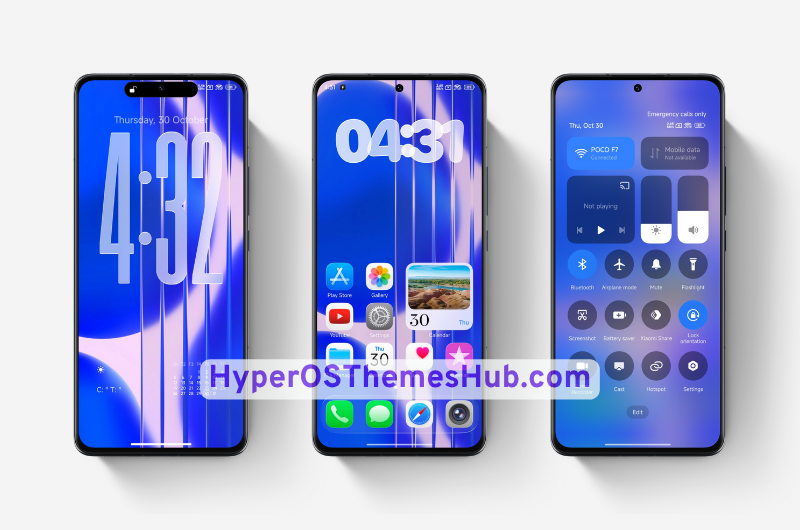
Looking for a refreshing and stylish look for your Xiaomi, Redmi, or POCO smartphone running HyperOS 2? The Lemon Bluery HyperOS Theme might be just what you need! Designed with vibrant aesthetics and smooth UI elements, this theme transforms your device into a sleek, modern interface while preserving system stability and performance.
In this post, you’ll find everything you need to know about the Lemon Bluery theme, including design highlights, features, compatibility, and how to install it easily on your device.
Lemon Bluery Theme For HyperOS 2 Details
| Theme | Lemon Bluery |
| Designer | MISANS |
| Region | Global |
| Compatibility | HyperOS, HyperOS 2 or later |
| Supported Devices | Xiaomi, Redmi, & POCO Phones |
| Get Access Via | Theme Store |
| Global Compatibility Access (Paid) | via Telegram |
Highlights of Lemon Bluery Theme
The Lemon Bluery theme offers a beautifully integrated user experience with a focus on sharp design and elegant transitions. Some of the core highlights include:
- Custom Lock Screen: A modern and animated lock screen with shortcuts for music, flashlight, and notifications.
- Modified Control Center: Redesigned toggles and smooth animations for brightness, Wi-Fi, and more.
- Themed Icons: A unique set of icons that follow a uniform and flat design language, giving your home screen a premium look.
- Dialer & Messaging UI: Minimalist interfaces for the dialer and messaging apps with dark/light compatibility.
- System Apps Reskin: Apps like Settings, File Manager, and Calculator come with a fresh look matching the theme tone.
- Fluid Animations: Smooth scrolling and subtle transitions throughout the system for a better visual experience.
Lemon Bluery Theme Screenshots


How to Install Lemon Bluery Theme via Backup Method (Easy Guide)
- Download the Lemon Bluery Theme Backup File
– First, download the backup file of the theme from the given link. - Create a Backup of Your Current Themes
– Go to Settings > About Phone > Backup & Restore > Mobile Device
– Enter your lockscreen password
– Uncheck all options, then open Other System App Data
– Scroll down and select only the “Themes” app, then tap Backup
– This will create a backup file of your currently installed themes. - Replace the Backup File
– Open File Manager > MIUI > backup > AllBackup
– Open the latest backup folder
– Replace the existing file with the one you downloaded in Step 1
⚠️ Make sure to replace, not copy-paste, or it may rename the file and not work. - Restore the Theme Backup
– Go back to Backup & Restore
– Tap on Restore, select the theme backup, and tap Restore again
– The theme will be restored on your device. - Apply the Theme
– Open Themes app > My Account > Themes
– You’ll see the theme there – just tap Apply, and you’re done!
Note: If the theme doesn’t apply fully, try restarting your device or reapply your theme.
Final Thoughts
The Lemon Bluery HyperOS Theme is a brilliant blend of customization and performance. It offers a smooth, stylish, and battery-friendly user interface without rooting or modifying your device. If you love tweaking your phone’s appearance or want a refreshing experience, this theme is worth trying.
Don’t forget to explore more exclusive HyperOS themes on our website. We’re constantly updating our collection with new and trending themes tailored just for Xiaomi users.
000